Architecting the production grade Static Website on Google Cloud

In This Article
We all have seen Most tutorials for hosting a static website on Google Cloud describe a simplistic pattern: create a bucket, run gsutil web set, open permissions with allUsers:objectViewer, and point DNS to a CNAME but have you ever dig into Architecting Static website at very peak of perfection for Production grade static website hosting on Google Cloud Storage.
If you are looking into Simple usage for you static website then here is document created by Google on Host a static website
Architecture
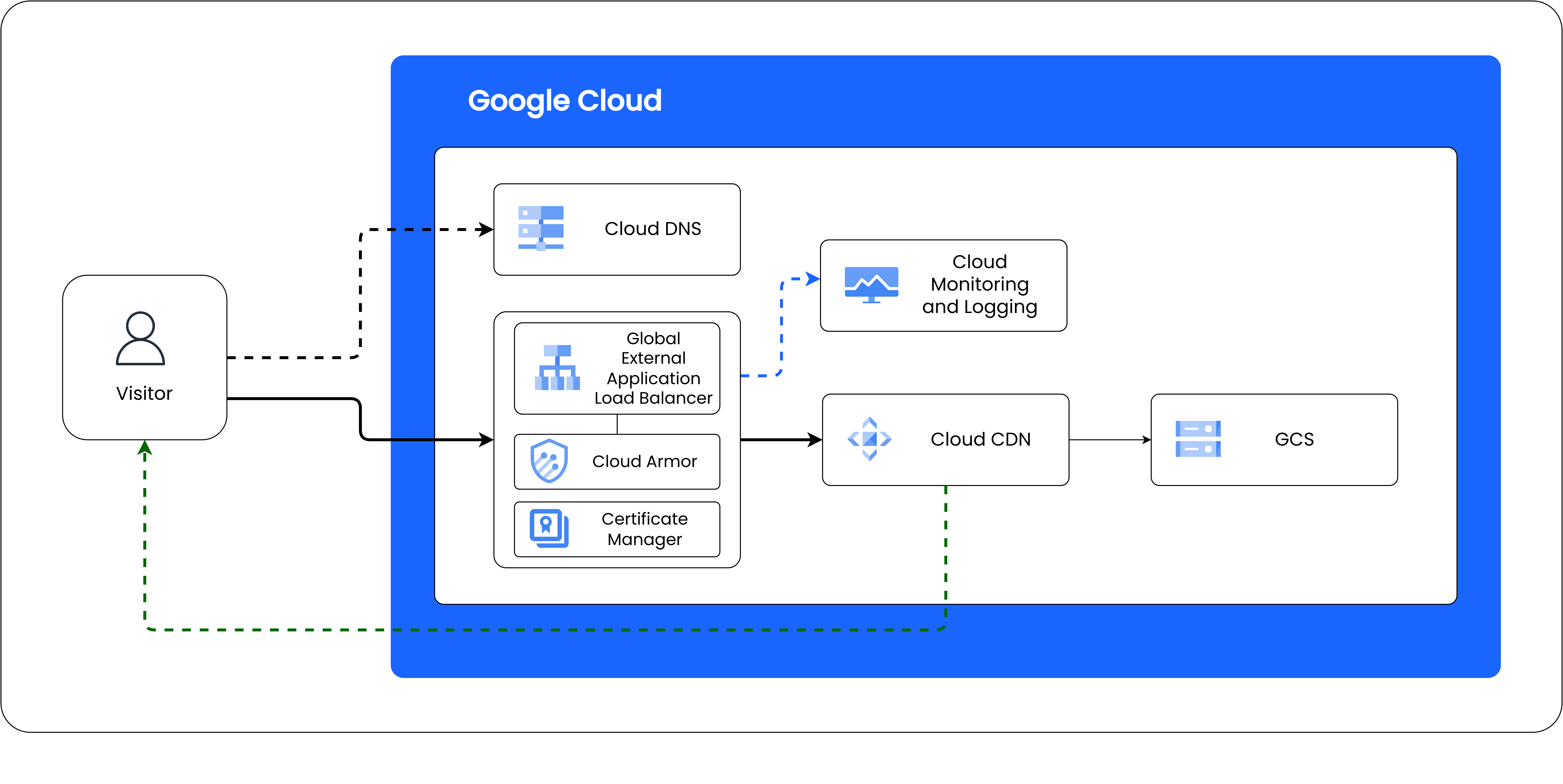
Deploying an enterprise-grade static web platform—such as a media-heavy photography gallery—requires addressing real production constraints:
- Preventing "Denial of Wallet" attacks: Malicious actors bypassing edge caches with cache-busting queries to run up origin read and egress bills.
- True Origin Resilience: Ensuring zero downtime and sub-second failover if an entire cloud region experiences an outage.
- Cache Integrity & Freshness: Serving gigabytes of responsive media with immutable 1-year cache headers while ensuring HTML entrypoints update globally in real time.
- Zero-Trust CI/CD: Deploying from GitHub Actions without maintaining long-lived JSON service account keys.
Here is the blueprint for engineering a static website at peak performance on Google Cloud.
Rather than exposing Cloud Storage directly to the public internet, all traffic traverses Google's Premium Global Network, protected at the edge by Cloud Armor and cached globally by Cloud CDN.
Here in this Architecture we
How it works
The build script reads every file in blogs-src/, parses its frontmatter, and renders the body
with marked. Each post becomes a standalone HTML file styled with
blog-post.css.
[!note] This box is an Obsidian-style callout. Use
> [!note],> [!tip],> [!warning], or> [!danger]at the start of a blockquote.
Writing content
Standard Markdown works — lists, bold, italic, links, and more.
# Build locally to preview
npm run dev
Code highlighting
Fenced code blocks are highlighted with highlight.js:
name: deploy
on:
  push:
    branches: [dev, main]
Diagrams with Mermaid
Fenced ```mermaid blocks render as diagrams:
Promoting to production
When a post looks good on dev.vazid.live, merge dev into main and it ships to vazid.live.
[!tip] Keep images in
blogs/assets/and reference them with relative paths so they deploy cleanly.